Conference Room
Conference Room Rental in Fullerton: What to Check Before You Book
Published Last updated 7 min read
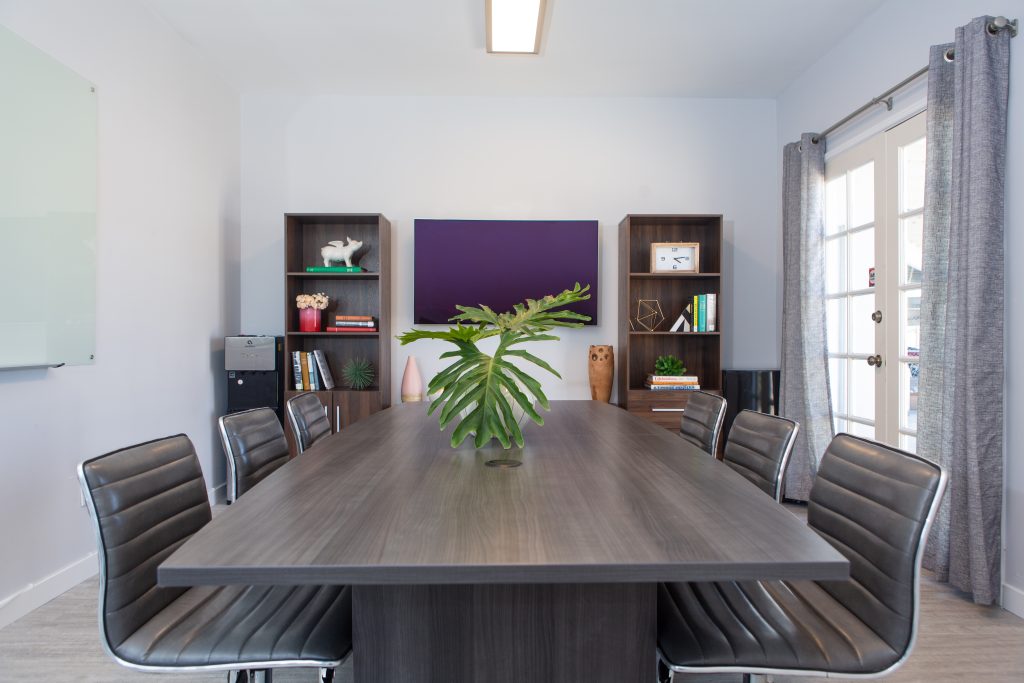
A conference room rental in Fullerton should do more than give you a table and chairs. If you are meeting a client, interviewing a candidate, hosting a planning session, or presenting to a small team, the room has to support the actual outcome of the meeting: focus, privacy, easy arrival, working technology, and a professional setting.
Before you book, use this checklist to compare your options. A room that looks fine online can still create problems if parking is unclear, the display setup is not ready, the room is too loud, or the hourly price does not include what your meeting really needs.
1. Check the Location and Arrival Experience
Start with the basics: can your guests find the building easily, park without confusion, and walk into a professional environment? In Fullerton, this matters because attendees may be coming from Anaheim, Brea, Buena Park, Placentia, Yorba Linda, or other parts of Orange County.
Look for a room with clear directions, convenient parking, and a simple arrival process. If guests have to circle the block, pay unexpected parking fees, or call you from the lobby because they cannot find the room, the meeting starts with friction.
ZworkSpace is located in Fullerton and offers a professional meeting setting with covered parking and onsite support. You can review the room details on our conference room rental page or compare options on the membership page.
2. Confirm the Room Capacity Before You Reserve
Capacity is not just about the number of chairs. A room that technically fits eight people may feel cramped once laptops, notebooks, drinks, presentation materials, or client documents are on the table. Ask how many people the room comfortably seats for the meeting format you have in mind.
- For interviews, leave enough room for personal space and note-taking.
- For client presentations, make sure everyone can see the screen without turning awkwardly.
- For board-style meetings, check whether the table supports laptops, documents, and conversation.
- For workshops, ask whether the room allows movement or only seated discussion.
If you are not sure what size you need, explain your meeting type before booking. A good workspace team should be able to tell you whether the room is a practical fit.
3. Review the Technology Setup
Technology is one of the biggest reasons to choose a professional conference room instead of a coffee shop or home office. Before you reserve, confirm what is included and what you need to bring.
- Is fast Wi-Fi included?
- Is there a display or screen for presentations?
- Do you need a specific adapter or cable?
- Can video calls work reliably from the room?
- Is there a whiteboard or writing surface?
- Is the room quiet enough for calls or recorded sessions?
If the meeting is important, test the setup before your guests arrive or ask whether staff can help you get connected. Five minutes of preparation can prevent a rushed start.
4. Ask About Privacy and Noise
Not every meeting belongs in an open coworking area. If you are discussing contracts, hiring decisions, legal matters, financial information, investor updates, or client strategy, privacy matters. A dedicated conference room should give you separation from common areas and enough sound control for a normal business conversation.
This is especially important for attorneys, consultants, real estate professionals, financial advisors, accountants, and small business owners who need to meet clients in a polished setting. For a related comparison, read our guide to booking a conference room for an important client meeting.
5. Understand the Price and What Is Included
Conference room pricing can look simple at first, but the final value depends on what the rate includes. Before you book, ask whether Wi-Fi, parking, display access, reception support, setup time, and cleanup time are included or handled separately.
If you meet regularly, it may be better to use a workspace plan that includes meeting-room access instead of booking each meeting one at a time. If you only need the room occasionally, an hourly or short-term rental may be enough. For more cost context, see 2026 Conference Room Rental in Fullerton: What It Costs and What to Look For.
6. Match the Room to the Meeting Type
The best conference room for a sales presentation may not be the best room for a hiring interview or internal planning session. Think about the purpose of the meeting before choosing a space.
- Client meetings: prioritize first impressions, privacy, and easy arrival.
- Team meetings: prioritize Wi-Fi, table space, and enough room for discussion.
- Interviews: prioritize quiet, comfort, and a professional but not intimidating setting.
- Presentations: prioritize screen visibility, seating layout, and connection support.
- Real estate or legal meetings: prioritize confidentiality and document space.
If your meeting involves real estate clients, investors, or contract review, you may also find this article useful: Best Conference Room Rental for Real Estate Investors in Fullerton for 2026.
7. Check Availability and Booking Flexibility
Some meetings are planned weeks ahead. Others happen because a client is suddenly available, a candidate needs a private interview, or a team needs a place to work through a problem. Ask how far in advance you should reserve, whether short-notice bookings are possible, and what happens if your meeting runs longer than expected.
Also check the cancellation or rescheduling policy. A room that is easy to book but hard to adjust may not be the best fit for client-driven schedules.
8. Look for Onsite Support
Onsite support is easy to overlook until something goes wrong. A professional workspace team can help with arrival questions, room access, basic setup, Wi-Fi issues, and general coordination. That support is one of the practical advantages of booking a room inside an established workspace instead of using an informal location.
If your meeting matters, choose a place where someone is available to help. You should be able to focus on the people in the room, not the logistics around the room.
Quick Checklist Before You Book
- Is the Fullerton location convenient for all attendees?
- Is parking clear and easy?
- Does the room comfortably fit your group?
- Is Wi-Fi included and reliable?
- Is there a display, whiteboard, or presentation setup?
- Is the room private enough for your meeting?
- Are all costs clear before you reserve?
- Can you book, extend, cancel, or reschedule easily?
- Is onsite support available if you need help?
Book a Conference Room in Fullerton
ZworkSpace offers a professional conference room in Fullerton for client meetings, interviews, presentations, team discussions, and small business appointments. The room is part of a flexible workspace with private offices, dedicated desks, virtual office service, mail handling, covered parking, and onsite support.
To check availability or ask whether the room is a good fit for your meeting, visit our conference room page or contact ZworkSpace.
FAQ
How many people should a small conference room fit?
For most client meetings, interviews, and planning sessions, a room for up to eight people is a practical size. It gives attendees enough space for laptops, documents, and conversation without feeling oversized.
Is a conference room better than meeting at a coffee shop?
For professional conversations, usually yes. A conference room gives you more privacy, better seating, reliable Wi-Fi, presentation tools, and fewer distractions than a public cafe.
Should I tour the conference room before booking?
If the meeting is important or recurring, a quick tour is helpful. You can confirm parking, room size, technology, privacy, and the arrival experience before your guests show up.